

 Loading...
About Bullet Force
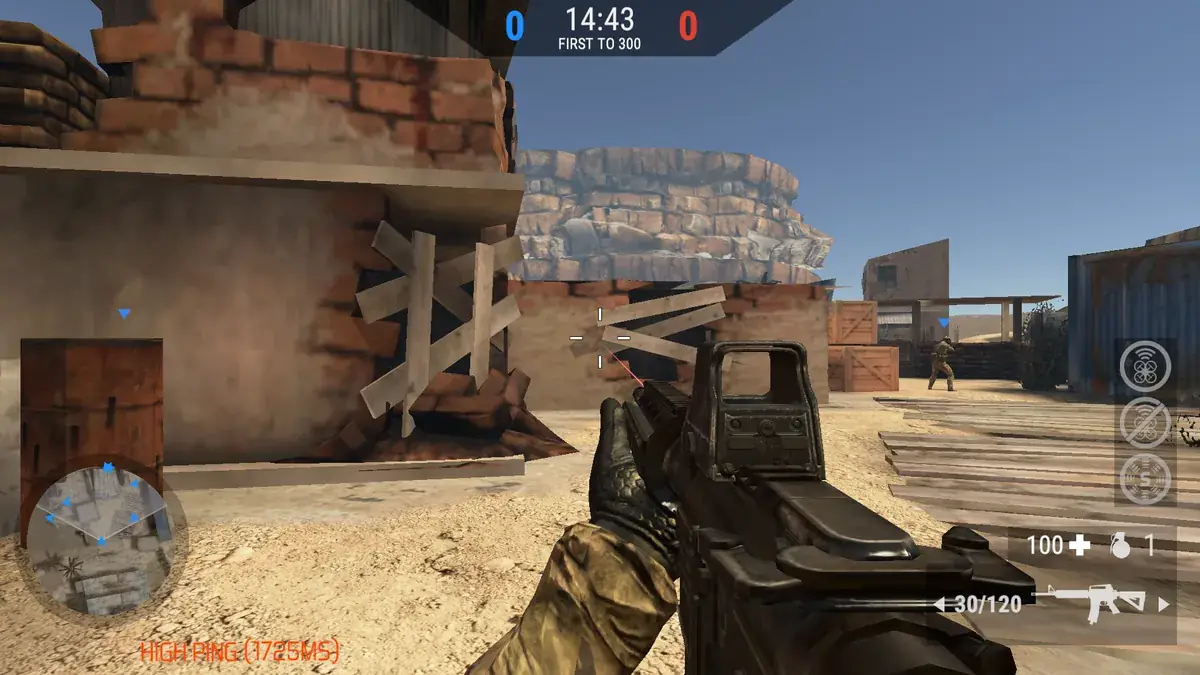
Bullet Force is a full multiplayer FPS that plays in a browser tab. It has modern weapons with attachments, several maps and classic online modes, and it was one of the first web shooters to feel like a console game.
If you want a serious shooter in a browser tab, this is a classic to try.
The game is a strong option for fans of console-style shooters who want a fuller experience in a browser. It suits players who enjoy unlocking weapons, customising loadouts and playing team modes.
Bullet Force at a glance
- Genre: Multiplayer FPS
- Players: Online multiplayer
- Devices: Desktop (keyboard and mouse recommended)
- Best for: players who want a full shooter in a browser
How to play Bullet Force
Join a match in modes such as Team Deathmatch, Free For All or Conquest, pick a loadout and fight. Experience unlocks new weapons and attachments, so your arsenal grows the more you play. Maps mix close-quarters areas with long sightlines, rewarding both aim and positioning.
For a first session, start with Team Deathmatch or Free For All and use the default assault rifle. Learn one map at a time, paying attention to the long sightlines and close-quarters areas. Aim down sights for every fight at range, and crouch to control recoil. As you level up, unlock attachments and try different primary weapons to see which suits the maps you play most.
Controls
- W A S D: move, Space: jump
- Mouse: aim, left click: fire, right click: aim down sights
- R: reload, C: crouch, Shift: sprint
- G: grenade, 1 to 3: switch weapon
- Touch screens: this version is built for keyboard and mouse, so a computer is strongly recommended
Modes, maps and progression
Bullet Force offers several classic modes, including Team Deathmatch, Free For All and Conquest. Team Deathmatch and Free For All focus on eliminations, while Conquest is about capturing and holding points on the map. The maps mix close-quarters areas with long sightlines, so different weapons shine in different places. Experience earned in matches unlocks new weapons and attachments, letting you shape your loadout around your style. Attachments such as sights and grips improve accuracy, which makes a noticeable difference as you level up.
Building a loadout
Pick a primary weapon that suits the map: assault rifles are versatile, SMGs dominate close quarters and snipers control long lanes. Attachments like sights and grips make a big difference to accuracy, so equip them as soon as they unlock.
Tips and strategies for Bullet Force
- Aim down sights for accurate shots at range.
- Crouch to reduce recoil.
- Equip attachments as soon as they unlock.
- Stay near teammates in team modes.
- Throw grenades into rooms before entering.
- In Conquest, defend captured points instead of rushing to the next one alone.
- Change your loadout to match the map rather than using one setup everywhere.
- Move after every kill so enemies cannot find you easily.
Common beginner mistakes
- Shooting from the hip at long range instead of aiming down sights.
- Ignoring attachments after unlocking them.
- Running alone across open areas.
- Using a sniper on a close-quarters map.
- Sticking with the default loadout for every map instead of trying the weapons and attachments you have already unlocked.
Similar games on TotoyaPlay
More browser FPS: Venge.io, Shell Shockers and Deadshot.io. More in our shooting games.
Frequently asked questions about Bullet Force
Is Bullet Force multiplayer?
Yes, you play online against other players.
What modes does Bullet Force have?
Modes include Team Deathmatch, Free For All and Conquest.
Can I customise weapons?
Yes, attachments unlock as you level up.
Can I unlock new weapons in Bullet Force?
Yes. Experience unlocks new weapons and attachments.
What is Conquest mode?
A mode in which teams capture and hold points on the map.
Is Bullet Force good for beginners?
Free For All and Team Deathmatch are good modes to start with.


Comments