

 Loading...
About Blockpost
Blockpost is a blocky first-person shooter with a serious side. The graphics are made of colourful voxels, but the gameplay follows classic tactical PC shooters, where map knowledge and good angles matter as much as aim.
If you like round-based shooters where every life counts, this is one of the best options you can play directly in a browser.
It is aimed at players who already enjoy tactical shooters and want a lighter, blocky version they can open in a browser tab, and at newcomers who want to learn team play without a complicated setup. Players who prefer pure run-and-gun action may find the slower pace takes some getting used to.
Blockpost at a glance
- Genre: Tactical voxel FPS
- Players: Online multiplayer
- Devices: Desktop (keyboard and mouse recommended)
- Best for: fans of round-based tactical shooters
How to play Blockpost
Pick a team and a mode, buy your weapons and head out. Team modes reward holding good positions and moving together, while deathmatch is faster and more forgiving. Between lives you can change your loadout in the buy menu: rifles, snipers, SMGs, pistols and grenades all have their place. Learn the main routes on each map, because the same choke points come up again and again.
Controls
- W A S D: move, Space: jump, Ctrl: crouch
- Mouse: aim and fire, right click: scope
- R: reload, G: grenade
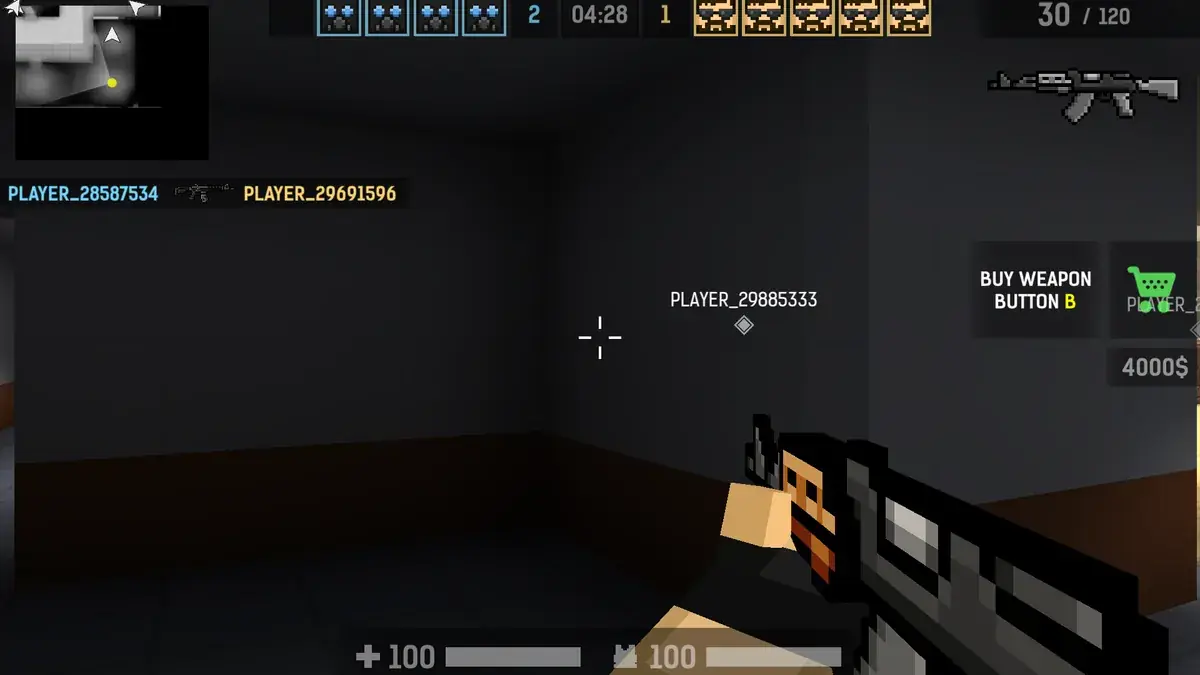
- B: buy / loadout menu
- Tab: scoreboard
- Touch screens: precise aiming needs a mouse, so Blockpost is best played on a computer
Modes, maps and loadouts
Blockpost offers team-based modes and a faster deathmatch, each played on several maps with recognisable routes and choke points. Instead of a long unlock grind, much of the depth comes from the buy and loadout menu: rifles for all-round fights, snipers for long lanes, SMGs for close quarters, plus pistols and grenades. Because you can change your setup between lives, you can adapt to the map and to the way the enemy team is playing. The more you learn each map, the better you become at choosing the right weapon before you even see an opponent.
Think like a tactical shooter
Running and gunning works sometimes, but Blockpost rewards a slower style. Pre-aim the corners you are about to clear, crouch to steady your aim at long range and use grenades to flush enemies out of tight spots. Sound helps too: footsteps often give away an enemy before you see him.
Tips and strategies for Blockpost
- Crouch before long-range shots for better accuracy.
- Pre-aim corners and doorways.
- Throw a grenade into a room before entering it.
- Buy armour and a reliable rifle before experimenting.
- Check the scoreboard to see which players to watch out for.
- Stay close to a teammate in team modes so you can trade an enemy who wins the first duel.
- Learn the two or three most common sniper positions on each map and avoid crossing their lines in the open.
Common beginner mistakes
- Sprinting around corners without pre-aiming.
- Firing long full-auto bursts at distance instead of short controlled ones.
- Buying a sniper on a close-quarters map.
- Fighting alone in team modes while the rest of the team holds a different area.
Similar games on TotoyaPlay
Like blocky shooters? Try Kirka.io and Voxiom, or the classic Blocky Combat SWAT. More in our shooting games.
Frequently asked questions about Blockpost
Is Blockpost multiplayer?
Yes, you play online against real players in team and free-for-all modes.
How do I buy weapons?
Press B to open the buy and loadout menu between lives.
Does Blockpost work on Chromebooks?
It runs in modern browsers, so most Chromebooks can play it.
Is Blockpost like Counter-Strike?
It shares the tactical style of classic PC shooters, with a blocky voxel look.
What weapons are in Blockpost?
Rifles, snipers, SMGs, pistols and grenades, chosen from the buy and loadout menu.
Can I change my loadout during a match?
Yes. Between lives you can open the menu with B and change your weapons.
Comments